Your inbox audit.
Your action plan.
Upload your Gmail Takeout export and get a complete breakdown of your inbox: who's flooding it, which newsletters you ignore, and a step-by-step plan to fix it.
▶How do I get my Takeout file?
- Go to takeout.google.com
- Click "Deselect all" at the top of the product list. Google defaults to almost everything selected; you need a clean slate first.
- Use your browser's find-on-page and search for mbox(not "mail" — too many matches). That jumps straight to the Mail row.
- Check Mail only. You should see about 1 of 82 selected (counts vary slightly).
Important: The default "Include all messages in Mail" setting exports All mail including Spam and Trash, which is often 10–20+ GB. Mail Zero caps Takeout .zip uploads at 150 MB and extracted .mbox files at 500 MB.
Option A — Inbox only (recommended): Click "All Mail data included" next to Mail to open the label dialog.
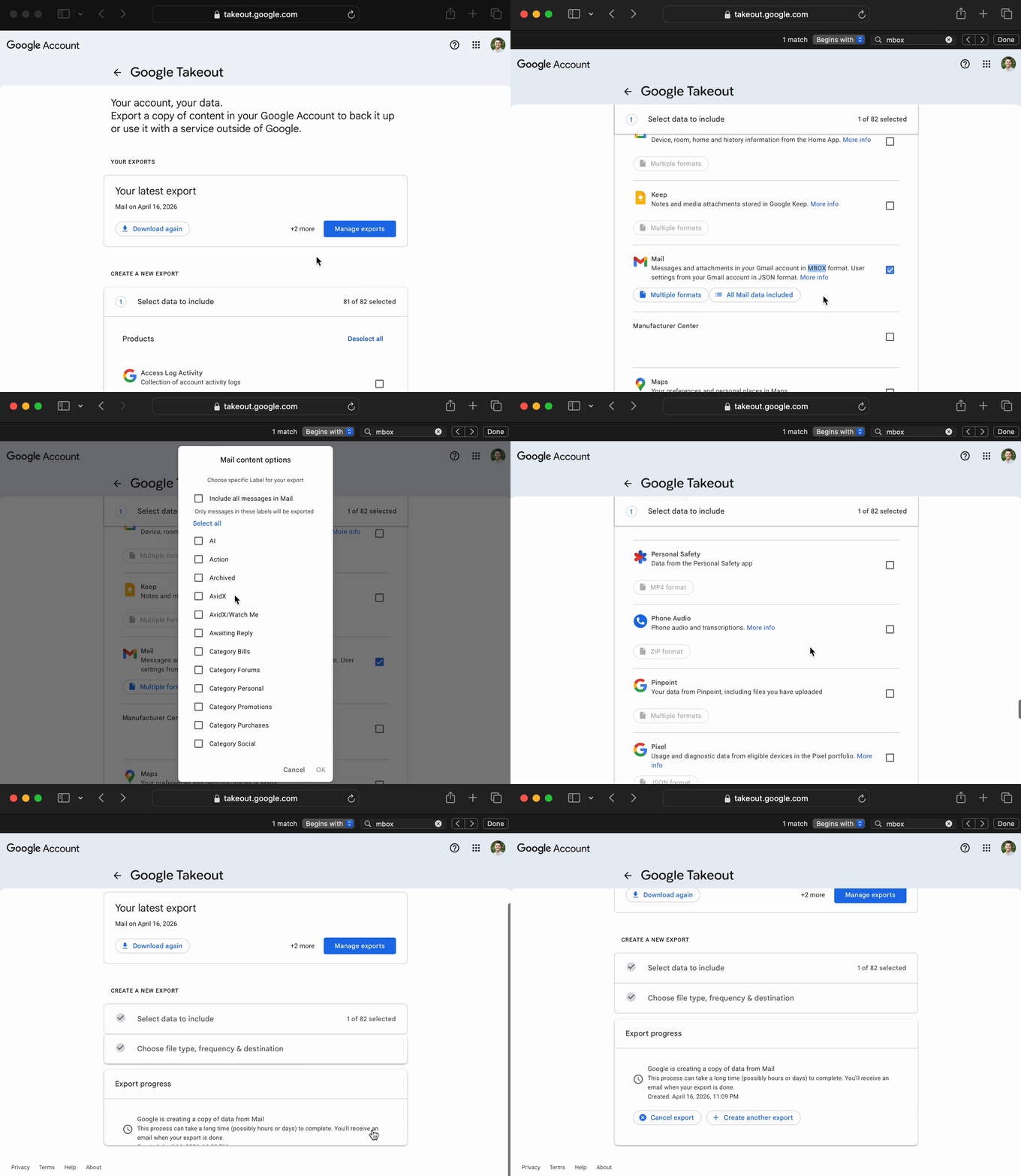
Full flow: main page through label dialog. In that dialog, uncheck "Include all messages in Mail", then uncheck all labels and check only Inbox. This gives a much smaller file that still covers what most people care about.
Option B — Export all mail:Leave "Include all messages in Mail" checked if you want full history including Sent, Archived, etc. Expect a very large download; upload the .mbox file inside the zip (not the zip itself), up to 500 MB.
- File type: .zip, File size: 2 GB (default)— click "Next step" → "Create export"
- Upload it here — takes less than 60 seconds
If Google splits your export into multiple files, upload any one of them — each part works on its own.
Drag & drop your Takeout .zip or .mbox file here
or click to browse · upload the .mboxfile from inside your Takeout zip · up to 500 MB · zip uploads up to 150 MB · large inbox? export Inbox label only
Your data is processed and immediately discarded. Never stored.
What you'll get
Inbox Health Score
A scored breakdown of read rate, active senders, volume trend, and recurring senders — with specific advice to improve each.
Action Plan
A prioritized checklist of exactly what to do — with copy-paste Gmail search queries ready to execute in seconds.
Newsletter Audit
See how many newsletters you’re on, which you actually read, and where attention leaks — the insight people screenshot and share.
Top & Silent Senders
See who emails you most, how often, and your read rate per sender. Silent senders you never open are flagged automatically.
"What If" Simulator
Check senders to simulate how much weekly email volume drops if you unsubscribe. See the impact before you act.
Duplicate Detection
Spot overlapping subscriptions and duplicate newsletters across domains — so you trim the right senders once.
Peak Hours Heatmap
See exactly when your email arrives by day and hour. Get personalized check-in time suggestions to batch your inbox.
Email Debt Tracker
See how long your unread emails have been sitting. We'll tell you exactly which ones to archive.
Gmail Filter Generator
Select senders, choose an action (archive, label, delete), and download a Gmail-importable filter file in one click.
Here's what your inbox looks like
Real analysis from a sample inbox — yours will look different.
Inbox Health Score
Quick Win
Unsubscribe from 5 senders you never open
The Athletic, NYTimes, Nextdoor, and 2 more are sending you email daily and you have not opened a single one.
⚡ -46 emails/week
from:theathletic@... OR from:editorpicks@...784
emails analyzed
287
unique senders
63%
unread rate
Sample inbox data — for illustration only.
Your data never leaves this session.
Processed in memory only — no accounts, no cookies, no tracking. Your email data is parsed server-side and immediately discarded. We never store, sell, or access your information.
Ready to reclaim
your inbox?
It takes less than 60 seconds. No sign-up required.
Drag & drop your Takeout .zip or .mbox file here
or click to browse · upload the .mboxfile from inside your Takeout zip · up to 500 MB · zip uploads up to 150 MB · large inbox? export Inbox label only
▶How do I get my Takeout file?
- Go to takeout.google.com
- Click "Deselect all" at the top of the product list. Google defaults to almost everything selected; you need a clean slate first.
- Use your browser's find-on-page and search for mbox(not "mail" — too many matches). That jumps straight to the Mail row.
- Check Mail only. You should see about 1 of 82 selected (counts vary slightly).
Important: The default "Include all messages in Mail" setting exports All mail including Spam and Trash, which is often 10–20+ GB. Mail Zero caps Takeout .zip uploads at 150 MB and extracted .mbox files at 500 MB.
Option A — Inbox only (recommended): Click "All Mail data included" next to Mail to open the label dialog.
Full flow: main page through label dialog. In that dialog, uncheck "Include all messages in Mail", then uncheck all labels and check only Inbox. This gives a much smaller file that still covers what most people care about.
Option B — Export all mail:Leave "Include all messages in Mail" checked if you want full history including Sent, Archived, etc. Expect a very large download; upload the .mbox file inside the zip (not the zip itself), up to 500 MB.
- File type: .zip, File size: 2 GB (default)— click "Next step" → "Create export"
- Upload it here — takes less than 60 seconds
If Google splits your export into multiple files, upload any one of them — each part works on its own.
Your data is processed and immediately discarded. Never stored.